You will probably want to have a different PEM file for each developer that will be accessing EC2 instances. This is good practice so that when a developer leaves the company or you want to remove their privileges to SSH into an EC2 instance. Here’s the link to create multiple pen keys for EC2 instances:
Showing posts with label files. Show all posts
Showing posts with label files. Show all posts
Sunday, June 22, 2014

Saturday, November 30, 2013
AWS S3 temporary access to S3 bucket files
Sharing files using S3 can be easily be done in the S3 buckets permission by adding 'everyone' to the permissions on the buckets and files. However, you probably don't want any person in the world accessing your files. Here are a couple of quick and easy methods.
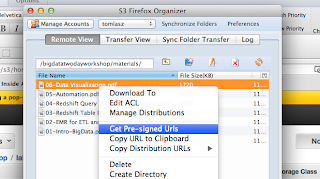
1. Temporary URL : Use a tool like S3Fox and you can get a pre-signed URL with a time limit. This limitation with this approach is that if you have a large number of files you need to generate and send a URL for each file.
2. IAM User : The policies you need to use can be found here: http://mikeferrier.com/2011/10/27/granting-access-to-a-single-s3-bucket-using-amazon-iam/
You also need to provide the URL for IAM user sign-in URL for your account, the IAM user, and the IAM user password. Remember, you need to add a password to the user after you create it.

It is then easy to delete this user or change the password to make sure that if this URL, account and password gets into the wrong hands your files are not downloaded.
1. Temporary URL : Use a tool like S3Fox and you can get a pre-signed URL with a time limit. This limitation with this approach is that if you have a large number of files you need to generate and send a URL for each file.

2. IAM User : The policies you need to use can be found here: http://mikeferrier.com/2011/10/27/granting-access-to-a-single-s3-bucket-using-amazon-iam/
You also need to provide the URL for IAM user sign-in URL for your account, the IAM user, and the IAM user password. Remember, you need to add a password to the user after you create it.

It is then easy to delete this user or change the password to make sure that if this URL, account and password gets into the wrong hands your files are not downloaded.
Sunday, October 6, 2013
Process to load Oracle data from on premise to RDS
RDS does not allow access to the native OS. However, using Oracle-managed files you can create a local directory that Oracle RDS can access. Here are the steps:
Local DB configuration

Local data pump directory

Here I run the export from my local DB

Now I go and update the Perl script with the Dump file name.
UTL_FILE package takes care of copying file. It took 3 minutes for 250MB file

Login to RDS database


Ran the import

And here we are – Schema DEEP is present in RDS database
TESTDB now.

The blog post adds more detail to this blog post: http://cloudconclave.blogspot.com/2013/04/importing-on-premise-oracle-database.html
Here is the Perl code:
#!/usr/bin/perl -w
use strict;
use DBI;
# RDS instance info
my $RDS_PORT=4080;
my $RDS_HOST="myrdshost.xxx.us-east-1-devo.rds-dev.amazonaws.com";
my $RDS_LOGIN="orauser/orapwd";
my $RDS_SID="myoradb";
my $SQL_INTEGER = 4;
my $SQL_VARCHAR = 12;
my $SQL_LONGRAW = 24;
# Oracle destination directory and file name (these could become parameters)
my $dirname = "DATA_PUMP_DIR";
my $fname = "test.bin";
my $data = "test";
my $chunk = 8192;
my $sql_open = "BEGIN perl_global.fh := utl_file.fopen(:dirname, :fname, 'wb', :chunk); END;";
my $sql_write = "BEGIN utl_file.put_raw(perl_global.fh, :data, true); END;";
my $sql_close = "BEGIN utl_file.fclose(perl_global.fh); END;";
my $sql_global = "create or replace package perl_global as fh utl_file.file_type; end;";
my $conn = DBI->connect('dbi:Oracle:host='.$RDS_HOST.';sid='.$RDS_SID.';port='.$RDS_PORT,$RDS_LOGIN, '')
|| die ( $DBI::errstr . "\n") ;
# create a package just to have a global variable
my $updated=$conn->do($sql_global);
# open the file for writing
my $stmt = $conn->prepare ($sql_open);
$stmt->bind_param_inout(":dirname", \$dirname, $SQL_VARCHAR);
$stmt->bind_param_inout(":fname", \$fname, $SQL_VARCHAR);
$stmt->bind_param_inout(":chunk", \$chunk, $SQL_INTEGER);
$stmt->execute() || die ( $DBI::errstr . "\n");
open (INF, $fname) || die "\nCan't open $fname for reading: $!\n";
binmode(INF);
$stmt = $conn->prepare ($sql_write);
my %attrib = ('ora_type',$SQL_LONGRAW);
my $val=1;
while ($val > 0) {
$val = read (INF, $data, $chunk);
$stmt->bind_param(":data", $data , \%attrib);
$stmt->execute() || die ( $DBI::errstr . "\n") ;
};
die "Problem copying: $!\n" if $!;
close INF || die "Can't close $fname: $!\n";
$stmt = $conn->prepare ($sql_close);
$stmt->execute() || die ( $DBI::errstr . "\n") ;
Subscribe to:
Posts (Atom)