Accenture released an AWS Security Primer at re:Invent last week: http://www.accenture.com/microsite/aws-2014/Documents/PDF/Accenture_Security_Perspective_AWS_web_final_1103.pdf
Showing posts with label iam. Show all posts
Showing posts with label iam. Show all posts
Tuesday, November 18, 2014

Thursday, April 24, 2014
IAM users and billing information
By default, IAM users do not have access to the Account Activity
or Usage Reports pages. However, as account owner you can grant IAM
users permission to see either or both. You can then activate access to the
billing pages, and those IAM users will have access to the billing pages
according to the permissions you grant. (You can deny them access to some
billing information.) http://docs.aws.amazon.com/awsaccountbilling/latest/about/ControllingAccessWebsite.html
Wednesday, April 2, 2014
IAM : AWS services not supported and tagging support
I often get the question of which services do not support IAM? Some services and features do not support IAM and must use the AWS root account credentials:
- Vulnerability Scanning Coordination Form
- AWS Workspaces
- Visibility of all Data Pipelines
- Specific account management pages, such as account profile, AWS account security credentials, payment methods and management of consolidated billing
- AWS DevPay
- CloudFront keypair creation
A full list of supported services is here:
http://docs.aws.amazon.com/IAM/latest/UserGuide/Using_SpecificProducts.html
This page also provides a great list of IAM resource level permissions support, tagging, and STS.
http://docs.aws.amazon.com/IAM/latest/UserGuide/Using_SpecificProducts.html
This page also provides a great list of IAM resource level permissions support, tagging, and STS.
Sunday, March 30, 2014
IAM integration with on premise LDAP
You can manually create IAM users with passwords for access to AWS resources using the AWS Management Console, AWS CLI or API calls. This is a great way to start, but you may already have an identity store (such as Active Directory) that you wish to leverage for AWS resource access. Two methods are possible: Replication and Federation.
With replication, you copy account credentials from your identity store into AWS IAM. This is useful for smaller organizations who need a quick solution without building ongoing connectivity between the two identity stores. While fast to execute, this method has some drawbacks such as: Limited to the number of accounts supported by IAM (5,000 default), changes between identity stores are not automatically propagated, this includes password changes, and disabling or deleting of accounts.
Federation can be done using AWS STS or a third-party such as Okta.
Remember IAM is not a substitute for an identity store such as Active Directory.
Federation can be done using AWS STS or a third-party such as Okta.
Remember IAM is not a substitute for an identity store such as Active Directory.
AWS IAM services and features that play a role when moving Oracle workloads to AWS
Identity and access management (IAM) is a key component of AWS security. IAM allows the creation of users, groups and roles. IAM services and features you will most likely consider when host Oracle on AWS are:
1. Security Token Service (STS) : STS generates temporary credentials for an IAM User or for users that you authenticate (federated users). Useful for improving security posture, mobile applications, and identity federation. Here are some basics of STS:
A. Generates a temporary Access Key, Secret Key, and Token
B. Expire automatically (15 minutes ~ 36 hours)
C. You write an “identity broker application” ( sample code here: http://docs.aws.amazon.com/STS/latest/UsingSTS/STSSampleApps.html)
D. Users authenticate to your identity broker
E. Your identity broker provisions temporary credentials via STS
F. SSO via the management console: Temporary credentials can be used to sign user directly into the AWS Management Console
B. Expire automatically (15 minutes ~ 36 hours)
C. You write an “identity broker application” ( sample code here: http://docs.aws.amazon.com/STS/latest/UsingSTS/STSSampleApps.html)
D. Users authenticate to your identity broker
E. Your identity broker provisions temporary credentials via STS
F. SSO via the management console: Temporary credentials can be used to sign user directly into the AWS Management Console
Get the temporary temporary token (access key ID, secret Key, and security token) by issuing the get_federation_token API call. The thing to keep in mind with your identity broker application is that you will have to have all the policies defined some where (in code as below, relational database, XML file, JSON templates, some file, etc) as you probably don't want to hard code in the application and will have 1000's of different users with different policies.
http://docs.aws.amazon.com/AWSSDKforPHP/latest/index.html#m=AmazonSTS/get_federation_token
The role needs to have a policy associated. Here is the way it is done it code:
));
Here is a REST web services call to generate temporary credentials: http://docs.aws.amazon.com/STS/latest/UsingSTS/CreatingFedTokens.htm
or you can use the assume-role API or web services all in document above. Here you would not need to send in a policy as the role would have a policy:
The role needs to have a policy associated. Here is the way it is done it code:
// Generate a new IAM policy (https://awspolicygen.s3.amazonaws.com/policygen.html)$policy = new CFPolicy($token, array( 'Statement' => array( array( 'Sid' => 'SID' . time(), 'Action' => array('s3:GetObject', 's3:GetObjectVersion', 's3:ListBucket', 's3:ListBucketVersions'), 'Effect' => 'Allow', 'Resource' => 'arn:aws:s3:::my-bucket/*' ) )Here is a REST web services call to generate temporary credentials: http://docs.aws.amazon.com/STS/latest/UsingSTS/CreatingFedTokens.htm
or you can use the assume-role API or web services all in document above. Here you would not need to send in a policy as the role would have a policy:
2. IAM resource level permissions - More information can be found here: http://aws.amazon.com/about-aws/whats-new/2013/07/08/announcing-resource-permissions-for-amazon-ec2-and-amazon-rds/
3. IAM Roles: Roles can be used to securely allow EC2 instances access other AWS services, enables identity federation with STS, cross account access, and web identity federation.
3. IAM Roles: Roles can be used to securely allow EC2 instances access other AWS services, enables identity federation with STS, cross account access, and web identity federation.
A. Allow your applications (e.g., Java) running on EC2 to securely access other services (e.g., S3, SQS, etc)
B. Identity federation (including STS)
C. Web Identity federation : Web Identity Federation allows authenticating via Login with Amazon, Facebook, or Google, getting temporary security credentials, and then using those credentials to make a request to AWS.
D. Allow cross-account management/access
Jane in Account A may assume a Role in Account B, giving Jane an Access Key/Secret Key/Token that may be used to make API calls to Account B.
Wednesday, December 4, 2013
Tagging Oracle Database Instances
Instance tagging is a great way to manage and monitor instances. It is also the way to do departmental billing and now with EC2 IAM resource level permissions a method to control the actions users and groups can perform on EC2 instances (more here: http://aws.amazon.com/about-aws/whats-new/2013/07/08/announcing-resource-permissions-for-amazon-ec2-and-amazon-rds/)
Placing tags on EC2 instances is this easy:
aws ec2 create-tags --resources i-f0ef69c6 --tags "Key=Cost Center,Value=AWS"
aws ec2 create-tags --resources i-f0ef69c6 --tags "Key=tier,Value=database"
aws ec2 create-tags --resources i-f0ef69c6 --tags "Key=environment,Value=test"
aws ec2 create-tags --resources i-f0ef69c6 --tags "Key=email,Value=thomas.laszewski@gmail.com"
Most monitoring and billing tools (CloudHealth, Cloudcheckr etc) use tagging to manage, monitor, and report costs and usage.
Placing tags on EC2 instances is this easy:
aws ec2 create-tags --resources i-f0ef69c6 --tags "Key=Cost Center,Value=AWS"
aws ec2 create-tags --resources i-f0ef69c6 --tags "Key=tier,Value=database"
aws ec2 create-tags --resources i-f0ef69c6 --tags "Key=environment,Value=test"
aws ec2 create-tags --resources i-f0ef69c6 --tags "Key=email,Value=thomas.laszewski@gmail.com"
To view all instances (and the value) with the cost center tag issue the following command:
aws ec2 describe-tags --filters "Name=key,Values=Cost Center"Most monitoring and billing tools (CloudHealth, Cloudcheckr etc) use tagging to manage, monitor, and report costs and usage.
Oracle credentials encrypted and protected in S3
Having worked with Oracle Databases for a very long time, this blog post really caught my interest. This is great way to insure Oracle credentials are not in scripts, environment variables, programs or other places where they can be read by the naked eye.
This blog post describes how DB credentials could be stored encrypted in S3. The role (IAM role) on the EC2 instance would be used with its short-term security credentials to let the client pull the DB credentials from S3 as needed.
This blog post describes how DB credentials could be stored encrypted in S3. The role (IAM role) on the EC2 instance would be used with its short-term security credentials to let the client pull the DB credentials from S3 as needed.
http://blogs.aws.amazon.com/security/post/Tx610S2MLVZWEA/Using-IAM-roles-to-distribute-non-AWS-credentials-to-your-EC2-instances
Saturday, November 30, 2013
AWS S3 temporary access to S3 bucket files
Sharing files using S3 can be easily be done in the S3 buckets permission by adding 'everyone' to the permissions on the buckets and files. However, you probably don't want any person in the world accessing your files. Here are a couple of quick and easy methods.
1. Temporary URL : Use a tool like S3Fox and you can get a pre-signed URL with a time limit. This limitation with this approach is that if you have a large number of files you need to generate and send a URL for each file.
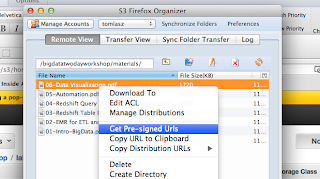
2. IAM User : The policies you need to use can be found here: http://mikeferrier.com/2011/10/27/granting-access-to-a-single-s3-bucket-using-amazon-iam/
You also need to provide the URL for IAM user sign-in URL for your account, the IAM user, and the IAM user password. Remember, you need to add a password to the user after you create it.

It is then easy to delete this user or change the password to make sure that if this URL, account and password gets into the wrong hands your files are not downloaded.
1. Temporary URL : Use a tool like S3Fox and you can get a pre-signed URL with a time limit. This limitation with this approach is that if you have a large number of files you need to generate and send a URL for each file.

2. IAM User : The policies you need to use can be found here: http://mikeferrier.com/2011/10/27/granting-access-to-a-single-s3-bucket-using-amazon-iam/
You also need to provide the URL for IAM user sign-in URL for your account, the IAM user, and the IAM user password. Remember, you need to add a password to the user after you create it.

It is then easy to delete this user or change the password to make sure that if this URL, account and password gets into the wrong hands your files are not downloaded.
Tuesday, October 22, 2013
AWS Trend Micro web cast replay
You can view the Trend Micro webinar regarding >Deep Security as a Service to deploy intrusion detection and prevention, anti-malware, anti-virus, integrity monitoring, firewall and web reputation on AWS:
http://www.youtube.com/watch?v=zOWcTC45ruw&feature=youtu.be
http://www.youtube.com/watch?v=zOWcTC45ruw&feature=youtu.be
Wednesday, August 14, 2013
AWS IAM user creation and access
IAM user set up can be found here:
http://docs.aws.amazon.com/IAM/latest/UserGuide/Using_SettingUpUser.html
Give them 'Power User' if they need to create instances and fully utilize AWS services.
They will use a different URL (not aws.amazon.com) then you use to access your account. More here:
http://docs.aws.amazon.com/IAM/latest/UserGuide/WhatUsersNeedToKnow.html
http://docs.aws.amazon.com/IAM/latest/UserGuide/Using_SettingUpUser.html
Give them 'Power User' if they need to create instances and fully utilize AWS services.
They will use a different URL (not aws.amazon.com) then you use to access your account. More here:
http://docs.aws.amazon.com/IAM/latest/UserGuide/WhatUsersNeedToKnow.html
Friday, July 12, 2013
AWS Security 101 for Oracle DBAs, Developers and Architects
Oracle DBAs understand securing data in transit and at rest, but they don't have to deal with file level encryption, security of the databases, firewalls, denial of service attacks, SQL injection attacks, and other OS level security.
General infrastructure security concepts:
1. Some networking concepts such as VPC, VPN, and IPSec also apply to the security realm. More on these concepts can be found here: http://cloudconclave.blogspot.com/2013/07/aws-network-101-for-oracle-dbas.html
1. SSL : The Secure Sockets Layer (SSL) is a commonly-used protocol for managing the security of a message transmission on the Internet. SSL uses the public-and-private key encryption system from RSA, which also includes the use of a digital certificate.
2. ACLs : Access Control Lists (ACLs) specifies which users or system processes are granted access to objects, as well as what operations are allowed on given objects.
3. MFA : Multifactor authentication (MFA) is a security system in which more than one form of
authentication is implemented to verify the legitimacy of a transaction. The goal of MFA is to
create a layered defense and make it more difficult for an unauthorized person to access a computer
system or network. An MFA device can be a Gemalto token (http://onlinenoram.gemalto.com/) or even an iPhone. http://cloudconclave.blogspot.com/2013/06/mfa-made-easy.html
4. Bastion Host :A bastion host is a special purpose computer on a network specifically designed and configured to withstand attacks. Information on bastion hosts on AWS with Oracle on these two posts: http://cloudconclave.blogspot.com/2013/05/aws-bastion-host-as-single-point-of.html http://cloudconclave.blogspot.com/2013/05/dba-and-developer-access-to-oracle.html
5. iptables : iptables are the tables provided by the Linux kernel firewall. These firewall rules make it possible for administrators to control what hosts can connect to the system, and limit risk exposure by limiting the hosts that can connect to a system. Information on iptables for security on AWS here: http://cloudconclave.blogspot.com/2013/06/aws-security-with-iptables.html
4. Bastion Host :A bastion host is a special purpose computer on a network specifically designed and configured to withstand attacks. Information on bastion hosts on AWS with Oracle on these two posts: http://cloudconclave.blogspot.com/2013/05/aws-bastion-host-as-single-point-of.html http://cloudconclave.blogspot.com/2013/05/dba-and-developer-access-to-oracle.html
5. iptables : iptables are the tables provided by the Linux kernel firewall. These firewall rules make it possible for administrators to control what hosts can connect to the system, and limit risk exposure by limiting the hosts that can connect to a system. Information on iptables for security on AWS here: http://cloudconclave.blogspot.com/2013/06/aws-security-with-iptables.html
6. IDS : An intrusion detection system (IDS) is a device or software application
that monitors network or system activities for malicious activities or
policy violations and produces reports to a management station. Some
systems may attempt to stop an intrusion attempt but this is neither
required nor expected of a monitoring system.
7. IPS : Intrusion prevention systems (IPS), also known as intrusion detection and prevention systems (IDPS), are network security appliances that monitor network and/or system activities for malicious activity. The main functions of intrusion prevention systems are to identify malicious activity, log information about this activity, attempt to block/stop it, and report it. Intrusion prevention systems are considered extensions of intrusion detection systems because they both monitor network traffic and/or system activities for malicious activity.
8. DoS : A denial-of-service attack (DoS attack) or distributed denial-of-service attack (DDoS attack) is an attempt to make a machine or network resource unavailable to its intended users. IPS, iptables, AWS security groups, NACLs, and bastion hosts are all ways to prevent DoS attacks.
9. Penetration testing : A penetration test, occasionally pentest, is a method of evaluating computer and network security by simulating an attack on a computer system or network from external and internal threats.
7. IPS : Intrusion prevention systems (IPS), also known as intrusion detection and prevention systems (IDPS), are network security appliances that monitor network and/or system activities for malicious activity. The main functions of intrusion prevention systems are to identify malicious activity, log information about this activity, attempt to block/stop it, and report it. Intrusion prevention systems are considered extensions of intrusion detection systems because they both monitor network traffic and/or system activities for malicious activity.
8. DoS : A denial-of-service attack (DoS attack) or distributed denial-of-service attack (DDoS attack) is an attempt to make a machine or network resource unavailable to its intended users. IPS, iptables, AWS security groups, NACLs, and bastion hosts are all ways to prevent DoS attacks.
9. Penetration testing : A penetration test, occasionally pentest, is a method of evaluating computer and network security by simulating an attack on a computer system or network from external and internal threats.
AWS specifics. You must be familiar with all of these concepts in order to perform basic actions on AWS and EC2:
1. Access key and secret key : The access key is used to access AWS using the CLI and TEST API. The REST and Query APIs use your access keys as the credential.You might be using a third-party product such as S3Fox or ElasticWolf that requires your
access keys (because the product itself makes AWS requests for you). Although access keys are primarily used for REST or Query
APIs, Amazon S3 and Amazon Mechanical Turk also use access keys with their SOAP APIs. Your Access Key ID identifies you as the party
responsible for service requests. You include it in each request, so
it's not a secret.The secret key provide anyone that possesses them incredible power to perform delete, terminate, start etc actions on your AWS resources (EC2, ELB, S3 etc) so be very careful with them. Don't e-mail it to anyone, include it any AWS requests, or post it on
the AWS Discussion Forums. No authorized person from AWS will ever ask
for your Secret Access Key.
2. x509 : X.509 certificates are based on the idea of public key cryptography. It is used for \making requests to AWS product SOAP APIs (except for Amazon S3 and Amazon Mechanical Turk, which use access keys for their SOAP APIs). SOAP services are being defocused so x509 will not be used as much moving forward.
3. Key pair file (SSH pem file) : You use an Amazon EC2 key pair (aka: PEM file) each time you launch an EC2 Linux/UNIX or Windows instance. The key pair ensures that only you have access to the instance.Each EC2 key pair includes a key pair name, a private key, and a public key. PEM is a file format that may consist of a certificate (aka. public key), a private key or indeed both concatenated together. Don't pay so much attention to the file extension; it means Privacy Enhanced Mail, a use it didn't see much use for but the file format stuck around. more on using PEM with EC2 here http://cloudconclave.blogspot.com/2012/09/connecting-to-aws-ec2-using-ssh-and-sftp.html
4. Security Groups : A security group acts as a firewall that controls the traffic allowed to reach one or more instances. When you launch an instance, you assign it one or more security groups. You add rules to each security group that control traffic for the instance. You can modify the rules for a security group at any time; the new rules are automatically applied to all instances to which the security group is assigned.
These AWS security concepts are not necessary but one you get beyond the 'playing around phase' of working with AWS these security components are key to working with AWS:
1. ARNs : Amazon Resource Names (ARNs) uniquely identify AWS resources. We require an ARN when you need to specify a resource unambiguously across all of AWS, such as in IAM policies, Amazon Relational Database Service (Amazon RDS) tags, and API calls. Here is an example ARN:
<!-- Amazon RDS tag -->
arn:aws:rds:eu-west-1:001234567890:db:mysql-db
ARNs are used extensively with IAM to place security/access policies on AWS services.
2. IAM : AWS Identity and Access Management (IAM) enables you to securely control access to AWS services and resources for your users. Using IAM you can create and manage AWS users and groups and use permissions to allow and deny their permissions to AWS resources. More details here: http://cloudconclave.blogspot.com/2012/10/aws-iam-service.html, http://cloudconclave.blogspot.com/2013/05/aws-getting-started-with-groups-and.html
3. NACLs : Network ACLs operate at the subnet level and evaluate traffic entering and exiting a subnet. Network ACLs can be used to set both Allow and Deny rules. Network ACLs do not filter traffic between instances in the same subnet. In addition, network ACLs perform stateless filtering while security groups perform stateful filtering.
2. x509 : X.509 certificates are based on the idea of public key cryptography. It is used for \making requests to AWS product SOAP APIs (except for Amazon S3 and Amazon Mechanical Turk, which use access keys for their SOAP APIs). SOAP services are being defocused so x509 will not be used as much moving forward.
3. Key pair file (SSH pem file) : You use an Amazon EC2 key pair (aka: PEM file) each time you launch an EC2 Linux/UNIX or Windows instance. The key pair ensures that only you have access to the instance.Each EC2 key pair includes a key pair name, a private key, and a public key. PEM is a file format that may consist of a certificate (aka. public key), a private key or indeed both concatenated together. Don't pay so much attention to the file extension; it means Privacy Enhanced Mail, a use it didn't see much use for but the file format stuck around. more on using PEM with EC2 here http://cloudconclave.blogspot.com/2012/09/connecting-to-aws-ec2-using-ssh-and-sftp.html
4. Security Groups : A security group acts as a firewall that controls the traffic allowed to reach one or more instances. When you launch an instance, you assign it one or more security groups. You add rules to each security group that control traffic for the instance. You can modify the rules for a security group at any time; the new rules are automatically applied to all instances to which the security group is assigned.
These AWS security concepts are not necessary but one you get beyond the 'playing around phase' of working with AWS these security components are key to working with AWS:
1. ARNs : Amazon Resource Names (ARNs) uniquely identify AWS resources. We require an ARN when you need to specify a resource unambiguously across all of AWS, such as in IAM policies, Amazon Relational Database Service (Amazon RDS) tags, and API calls. Here is an example ARN:
<!-- Amazon RDS tag -->
arn:aws:rds:eu-west-1:001234567890:db:mysql-db
ARNs are used extensively with IAM to place security/access policies on AWS services.
2. IAM : AWS Identity and Access Management (IAM) enables you to securely control access to AWS services and resources for your users. Using IAM you can create and manage AWS users and groups and use permissions to allow and deny their permissions to AWS resources. More details here: http://cloudconclave.blogspot.com/2012/10/aws-iam-service.html, http://cloudconclave.blogspot.com/2013/05/aws-getting-started-with-groups-and.html
3. NACLs : Network ACLs operate at the subnet level and evaluate traffic entering and exiting a subnet. Network ACLs can be used to set both Allow and Deny rules. Network ACLs do not filter traffic between instances in the same subnet. In addition, network ACLs perform stateless filtering while security groups perform stateful filtering.
4. S3 SSE : http://cloudconclave.blogspot.com/2013/07/s3-sse-without-request-header.html Server-side encryption is about data encryption at rest, that is, Amazon S3 encrypts your
data as it writes it to disks in its data centers and decrypts it for you when you access
it. As long as you authenticate your request and you have access permissions, there is no
difference in the way you access encrypted or unencrypted objects. Amazon S3 manages
encryption and decryption for you. For example, if you share your objects using a pre-signed
URL, the pre-signed URL works the same way for both encrypted and unencrypted objects.
5. Data Encryption : AWS does not provide encryption of EBS (Elastic Block Storage) . More details on a couple of vendors that provide solutions here: http://cloudconclave.blogspot.com/2013/04/ebs-volume-encryption.html
Tuesday, May 28, 2013
AWS SSL certificates
All your SSL server certificates are managed by AWS Identity and Access management (IAM). By default, IAM allows 10 server certificates per AWS account. If you try to upload a new server certificate after reaching this limit, you'll get an error. You can request for more certificates using this form - IAM Limit Increase Contact Us Form.
Subscribe to:
Posts (Atom)