By default, IAM users do not have access to the Account Activity
or Usage Reports pages. However, as account owner you can grant IAM
users permission to see either or both. You can then activate access to the
billing pages, and those IAM users will have access to the billing pages
according to the permissions you grant. (You can deny them access to some
billing information.) http://docs.aws.amazon.com/awsaccountbilling/latest/about/ControllingAccessWebsite.html
Showing posts with label permissions. Show all posts
Showing posts with label permissions. Show all posts
Thursday, April 24, 2014

Wednesday, April 2, 2014
IAM : AWS services not supported and tagging support
I often get the question of which services do not support IAM? Some services and features do not support IAM and must use the AWS root account credentials:
- Vulnerability Scanning Coordination Form
- AWS Workspaces
- Visibility of all Data Pipelines
- Specific account management pages, such as account profile, AWS account security credentials, payment methods and management of consolidated billing
- AWS DevPay
- CloudFront keypair creation
A full list of supported services is here:
http://docs.aws.amazon.com/IAM/latest/UserGuide/Using_SpecificProducts.html
This page also provides a great list of IAM resource level permissions support, tagging, and STS.
http://docs.aws.amazon.com/IAM/latest/UserGuide/Using_SpecificProducts.html
This page also provides a great list of IAM resource level permissions support, tagging, and STS.
Wednesday, December 4, 2013
Tagging Oracle Database Instances
Instance tagging is a great way to manage and monitor instances. It is also the way to do departmental billing and now with EC2 IAM resource level permissions a method to control the actions users and groups can perform on EC2 instances (more here: http://aws.amazon.com/about-aws/whats-new/2013/07/08/announcing-resource-permissions-for-amazon-ec2-and-amazon-rds/)
Placing tags on EC2 instances is this easy:
aws ec2 create-tags --resources i-f0ef69c6 --tags "Key=Cost Center,Value=AWS"
aws ec2 create-tags --resources i-f0ef69c6 --tags "Key=tier,Value=database"
aws ec2 create-tags --resources i-f0ef69c6 --tags "Key=environment,Value=test"
aws ec2 create-tags --resources i-f0ef69c6 --tags "Key=email,Value=thomas.laszewski@gmail.com"
Most monitoring and billing tools (CloudHealth, Cloudcheckr etc) use tagging to manage, monitor, and report costs and usage.
Placing tags on EC2 instances is this easy:
aws ec2 create-tags --resources i-f0ef69c6 --tags "Key=Cost Center,Value=AWS"
aws ec2 create-tags --resources i-f0ef69c6 --tags "Key=tier,Value=database"
aws ec2 create-tags --resources i-f0ef69c6 --tags "Key=environment,Value=test"
aws ec2 create-tags --resources i-f0ef69c6 --tags "Key=email,Value=thomas.laszewski@gmail.com"
To view all instances (and the value) with the cost center tag issue the following command:
aws ec2 describe-tags --filters "Name=key,Values=Cost Center"Most monitoring and billing tools (CloudHealth, Cloudcheckr etc) use tagging to manage, monitor, and report costs and usage.
Saturday, November 30, 2013
AWS S3 temporary access to S3 bucket files
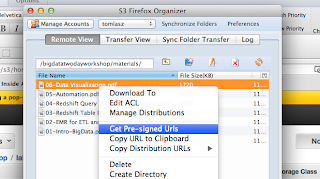
Sharing files using S3 can be easily be done in the S3 buckets permission by adding 'everyone' to the permissions on the buckets and files. However, you probably don't want any person in the world accessing your files. Here are a couple of quick and easy methods.
1. Temporary URL : Use a tool like S3Fox and you can get a pre-signed URL with a time limit. This limitation with this approach is that if you have a large number of files you need to generate and send a URL for each file.
2. IAM User : The policies you need to use can be found here: http://mikeferrier.com/2011/10/27/granting-access-to-a-single-s3-bucket-using-amazon-iam/
You also need to provide the URL for IAM user sign-in URL for your account, the IAM user, and the IAM user password. Remember, you need to add a password to the user after you create it.

It is then easy to delete this user or change the password to make sure that if this URL, account and password gets into the wrong hands your files are not downloaded.
1. Temporary URL : Use a tool like S3Fox and you can get a pre-signed URL with a time limit. This limitation with this approach is that if you have a large number of files you need to generate and send a URL for each file.

2. IAM User : The policies you need to use can be found here: http://mikeferrier.com/2011/10/27/granting-access-to-a-single-s3-bucket-using-amazon-iam/
You also need to provide the URL for IAM user sign-in URL for your account, the IAM user, and the IAM user password. Remember, you need to add a password to the user after you create it.

It is then easy to delete this user or change the password to make sure that if this URL, account and password gets into the wrong hands your files are not downloaded.
Saturday, June 29, 2013
Inheriting the Oracle user environment
Here is the command:
sudo –H –u oracle logbash –login
You must have permissions to sudo to “oracle” directly for this to work. This is preferred rather than sudo’ing to root and then su’ing to oracle (su - oracle)
Monday, April 15, 2013
CloudFormation access denied error message
In the event you get this message when a CloudFormation script:
AccessDenied. User doesn't have permission to call ec2:RunInstances, this could mean that the AMI is not available or you don't have access to it. The error is not intuitive. Check to make sure the AMI exists or if you have access to it.
Subscribe to:
Comments (Atom)