Showing posts with label migration. Show all posts

Friday, September 25, 2015

re:Invent Partner Day : Cloud Migration and Optimization Session

Join me at 1.30 on October 6th at the AWS re:Invent Global Partner Summit

Realizing the Benefits of Cloud: Cloud Migration & Application Optimization
As AWS continues to expand, enterprise customers are increasingly looking to our partner ecosystem to assist in migrating their workloads to the cloud.  This session covers migration estimation, data migration, critical path activities, migration automation, and best practices for large-scale application migrations. We will use real examples from our consulting partners and AWS Professional Services to illustrate how to move workloads to the cloud while modernizing the associated applications to take advantage of AWS’ unique benefits. We will also dive into optimization of your application using AWS Services that are non-intrusive to your application, as well as those that require some application changes but help customers to achieve higher levels of performance, high availability, and scalability.  After attending this session, you will understand how to estimate a migration effort, understand the most time intensive tasks, the tools available, options for data migration, when to re-host an application and when to re-architect, and how to architect and optimize the end state AWS architecture.

Thursday, April 2, 2015

AWS Migration Sessions

Migrating large fleets of legacy applications to AWS cloud infrastructure requires careful planning, since each phase needs to balance risk tolerance against the speed of migration.
Through participation in many large-scale migration engagements with customers, AWS Professional Services has developed a set of successful best practices, tools, and techniques that help migration factories optimize speed of delivery and success rate. In this session, we cover the complete lifecycle of an application portfolio migration with special emphasis on how to organize and conduct the assessment and how to identify elements that can benefit from cloud architecture.

April 9th in SF @ Moscone 

Breakout Sessions 2:00 - 3:00

Cloud Migration, Application Modernization and Security for Partners

As AWS continues to expand, enterprise customers are increasingly looking to our partner ecosystem to assist in migrating their workloads to the cloud. This session describes the challenges, lessons learned and best practices for large scale application migrations. We will use real examples from our consulting partners and AWS Professional Services to illustrate how to move workloads to the cloud while modernizing the associated applications to take advantage of AWS’ unique benefits. We will also dive into how to use an array of AWS services and features to improve a customer’s security posture as they are migrating and once they are up and running in the cloud.


Tuesday, January 27, 2015

February 4 | Wednesday - Migrating Thousands of Workloads to AWS at Enterprise Scale

Migrating Thousands of Workloads to AWS at Enterprise Scale Many large enterprises have begun using AWS to host development and test environments while also building greenfield applications in AWS. After realizing the benefits that AWS has to offer, many Enterprise look for ways to accelerate their migration to the cloud. In beginning this journey they are often faced with a number of challenges such as determining which applications should move, how they should move, and how can they be effectively managed in the cloud.  AWS Solution Architects and AWS Professional Services have developed a migration methodology, based on our experiences, to quickly, efficiently, and successfully move enterprise applications to AWS at scale.  This session will be pragmatic; covering the challenges, lessons learned, best practices, and end architecture for several large scale migrations done by AWS Global System Integrator partners. This session will also review the approach, tools, and methods that can help Enterprises evolve their cloud transformation programs.


2 PM - 3 PM

Monday, January 5, 2015

Amazon data warehouse migration to Amazon Redshift

Informative video on moving an Oracle RAC and Hadoop based web log data mining solution to Amazon Redshift:

https://www.youtube.com/watch?v=P4KPPvEb_QI

Migrating to AWS : Amazon.com

Nice session on how Amazon.com has migrated several different types of workloads to AWS:
1. Rehost - Amazon.com web site : Details on an existing workload migrated to AWS.  'Classic' web site migration of web application to AWS.
2. Rearchitecture  - Database migration : Migrating application data to AWS from a traditional data store to AWS is way to reduce costs.  This use cases uses an Information Lifecycle approach to moving data off of a live production databases to S3. 
3. Replace - Application replacement : Deprecation of an order system, and implementing the new order system on AWS.
4. Green field : Using AWS for development of a new video service used internally at Amazon.

The video goes into details on how AWS can reduce costs, improve development productivity, enable elastic infrastructure, increase scalability, and improve high availability. 

Thursday, April 10, 2014

Data Center Migration to AWS

Learn how RISO Inc. used Apps Associates services to move their data center to the AWS cloud. In so doing, RISO Inc. avoided capital intensive hardware purchases and redeployed IT staff to projects that directly supported their business goals. We'll also describe how you can integrate your existing environment with the cloud to create a hybrid architecture.


Monday, March 31, 2014

Peoplesoft on AWS

Here are some case studies and materials for running Oracle Peoplesoft on AWS:

1. Select Staffing presented along with AWS and DLZPhttp://www.slideshare.net/tomlaszewski/dat202-using-amazon-rds-to-power-enterprise-applications-1-0
2. Data migration from on premise Oracle to Oracle AWS RDS (same technique can be used for EC2, in fact, with EC2 may be easier to just do an RMAN dump, FTP, SCP or Tsunami to transfer to AWS,) and restore using RMAN on EC2). http://www.slideshare.net/tomlaszewski/advanced-data-migration-techniques-for-amazon-rds
3. Best practices for Peoplesoft on premise to AWS done at Oracle OpenWorld last year by DLZPhttp://www.slideshare.net/tomlaszewski/oracle-peoplesoft-on-aws

Friday, January 10, 2014

Migrating data from on premise to AWS

Here are some the approximate transfer rates for Amazon Storage Gateway and Riverbed Whitewater:

  • Amazon Storage Gateway 5 TB a day
  • Riverbed Whitewater  3-5 TB an hour

Keep in mind that using gateways to migrate a relational database is probably not the best option as these mechanism use snapshots.

Other blog entries are here:

Migrating data for migrating to RDS but useful for EC2 based databases as well: http://cloudconclave.blogspot.com/2013/10/loading-data-from-on-premise-oracle.html

This blog discusses the time it takes to transfer 1 TB of data over different lines with different transfer speeds: http://cloudconclave.blogspot.com/2013/02/oracle-db-data-transfer-to-aws.html

Mechanisms to bulk migrate data: http://cloudconclave.blogspot.com/2013/06/bulk-loading-data-to-aws-from-on-premise.html

Here is a blog post on different transfer mechanisms for applications but could be used for databases:http://cloudconclave.blogspot.com/2013/04/on-premise-application-replication-and.html

Attunity CloudBeam: http://cloudconclave.blogspot.com/2013/12/moving-and-migrating-data-from-on.html

Thursday, January 2, 2014

Accenture white paper : Disaster Recovery with Amazon Web Services


Disaster Recovery with Amazon Web Services:
A Technical Guide
The paper covers
1. Define the challenges that enterprises face in adopting public cloud solutions for disaster recovery.
2. Describe the value that large enterprises can gain by adopting cloud-based DR with services such as Amazon Web Services (AWS) for disaster recovery.
3. Provide recommended disaster recovery architecture patterns.

http://www.accenture.com/microsite/reinvent-2013/Documents/Accentue-Smart-Disaster-Recovery-with-Amazon-Web-Services.pdf

Thursday, December 5, 2013

Migrate EC2 instance from EC2-Classic account to EC2-VPC account

Here is the process to move a one EC2 instance from an EC2-Classic account to an EC2-VPC default account.

Create VPC
Note: since this is a new account, it will have a VPC by default. It will have one VPC, 3 subnets, 1 Network ACL, 1 Internet Gateway, 1 Route table by default. vpc-bb55bbd0 is the default VPC. 

We can use the default VPC or create a new one as well.

1. Create the VPC

a.     Click the Your VPCs link
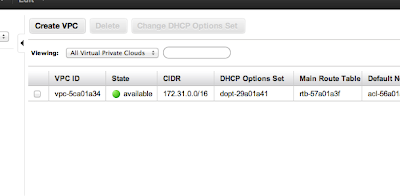
b.     Click the Create VPC button. (you will see your default VPC already created)
Note the VPC ID: vpc-e7262c85
c.     In the Create   VPC dialog box, enter a CIDR Block of 10.50.0.0/16.


d.     Click Yes, Create.
2 .     Create four subnets : two public and two private subnet. Want to so we can have a  Active-passive failover scenario. We will only use the two public subnets to start as there is no database back end.
Create Public Subnet in First AZ
a.     Select the Subnets link from the left hand menu.
b.     Click the Create Subnet button.


c.     Ensure that the VPC is set to the one created earlier.
d.     Choose an Availability Zone.
e.     Specify a CIDR Block of 10.50.1.0/24.
f.      Click Yes, Create.
Note : First public subnet: subnet-599d963b
3. Create Public Subnet in Second AZ
a.     Select the Subnets link from the left hand menu.


b.     Click the Create Subnet button.
c.     Ensure that the VPC is set to the one created earlier.
d.     Choose an Availability Zone.
e.     Specify a CIDR Block of 10.50.2.0/24.
f.      Click Yes, Create.
Note : Second public subnet: subnet-10714464

4. Create first private Subnet in First AZ
a.     Select the Subnets link from the left hand menu.
b.     Click the Create Subnet button.


c.     Ensure that the VPC is set to the one created earlier.
d.     Choose an Availability Zone.
e.     Specify a CIDR Block of 10.50.10.0/24.  (I jumped up to 10 to give more room for public subnet expansion on first AZ and started with 10 so all subnets in first AZ start with one).
f.      Click Yes, Create.
Note : First private subnet: subnet-389d965a

5. Create second private Subnet in second AZ
a.     Select the Subnets link from the left hand menu.
b.     Click the Create Subnet button.

c.     Ensure that the VPC is set to the one created earlier.
d.     Choose an Availability Zone.
e.     Specify a CIDR Block of 10.50.20.0/24.  (I jumped up to 10 to give more room for public subnet expansion on first AZ and started with 10 so all subnets in first AZ start with one).
f.      Click Yes, Create.
Note : Second private subnet: subnet-fe71448a


6.     Create Internet Gateway
a.     First step: Create Internet Gateway
b.     Then attach to VPC
Created : igw-9d0903ff
4.     Create route table for public subnet. Note: We will not create one for the private subnets at this time as no instances in them.
a.     Create a route table for the VPC


b.     Add the public route to the internet gateway to the route table


                                               i.     Add a route with a Destination of 0.0.0.0/0 and with Target set to the Internet Gateway.

c.      Associate the First public subnet: subnet-599d963b to the route table

d.     Associate the Second public subnet: subnet-10714464 to the route table


58.     Create Elastic IP : 54.201.96.147
69.     Create Security groups : ELB, WebTier
a.     ELB : Add a rule that allows TCP port 80 (HTTP) from 0.0.0.0/0 (everywhere, including the Internet). sg-c8a3b5aa


b.     WebTier  sg-58adbb3a


710.     No need to create NAT and route NAT to the Internet Gateway as have nothing in private subnet at this time.


Create ELB


1. Create ELB


2. Add health check


13.     Add subnets and security groups


Launch Instance


1.     Could not use the AMI from the old account as was not valid. 
2.     Launched instance from AMI eligble for free tier.
3.     Created snapshot of EBS root volume in old account
4.     Gave permissions on new account to snapshot – snap-8fd359b4
5.     aws ec2 describe-snapshots --snapshot-ids snap-8fd359b4
6.     aws ec2 create-volume --snapshot-id snap-8fd359b4 --size 8 --availability-zone us-west-2a
7.     aws ec2 describe-volumes --volume-ids vol-41a11c68
8.     aws ec2 stop-instances --instance-id i-c12ca6f7
9.     aws ec2 detach-volume --volume-id vol-2ba51802
10.  aws ec2 attach-volume --volume-id vol-41a11c68 --instance-id i-c12ca6f7 --device /dev/sda1
11. aws ec2 start-instances --instance-id i-c12ca6f7
13. need to attach to ELB. I did this in the console
14. Needed to start apache as forgot to include in user data: sudo /etc/init.d/httpd start
15. Test on Elastic IP address : 54.222.94.234 (worked so closed HTTP on instance for 0.0.0.0/0)
17. Test running instance before migrating route 53: LoadBalancer-788377229.us-west-2.elb.amazonaws.com

Migrate Route 53


1.     Create hosted zones
2.     Create record sets
3.     Go to your domain name registry (in this case godaddy) and launch (godaddy terminology) your domain name to set your Nameservers.  Use the four name services/delegation set retrieved in step 1.

Decommission the old account 

1.     Spin down EC2 instance
2.     Decommision Route 53
3.     Delete all EBS volumes and snapshots