Sharing files using S3 can be easily be done in the S3 buckets permission by adding 'everyone' to the permissions on the buckets and files. However, you probably don't want any person in the world accessing your files. Here are a couple of quick and easy methods.
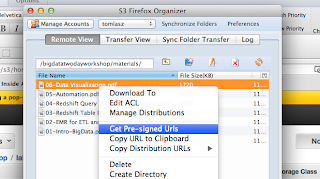
1. Temporary URL : Use a tool like S3Fox and you can get a pre-signed URL with a time limit. This limitation with this approach is that if you have a large number of files you need to generate and send a URL for each file.
2. IAM User : The policies you need to use can be found here: http://mikeferrier.com/2011/10/27/granting-access-to-a-single-s3-bucket-using-amazon-iam/
You also need to provide the URL for IAM user sign-in URL for your account, the IAM user, and the IAM user password. Remember, you need to add a password to the user after you create it.

It is then easy to delete this user or change the password to make sure that if this URL, account and password gets into the wrong hands your files are not downloaded.
1. Temporary URL : Use a tool like S3Fox and you can get a pre-signed URL with a time limit. This limitation with this approach is that if you have a large number of files you need to generate and send a URL for each file.

2. IAM User : The policies you need to use can be found here: http://mikeferrier.com/2011/10/27/granting-access-to-a-single-s3-bucket-using-amazon-iam/
You also need to provide the URL for IAM user sign-in URL for your account, the IAM user, and the IAM user password. Remember, you need to add a password to the user after you create it.

It is then easy to delete this user or change the password to make sure that if this URL, account and password gets into the wrong hands your files are not downloaded.
